
SqueezePlay Applets
From SqueezeboxWiki
This page hosts SqueezeboxController, SqueezeboxRadio, SqueezeboxTouch and SqueezePlay Applets (Extras) written by the community. For the ease of writing most of the time 'Controller' will be used.
You may download and install these applets on your Squeezebox Controller to add extra capabilities or fun additions such as games. You can also read a guide to developing new applets.
Contents |
Installing Applets
Currenty there are two ways to install an applet on your Squeezebox Controller:
- via applet installer (preferred)
- manual installation.
For the applet installer to work, applet developers have to provide a repository-URL pointing to their applets.
Many older applets unfortunately are not listed in a repository, that's why manual installation often is the only way to get an applet on the controller.
Applet Installer
Installing an applet is a two step process.
- You need to have a 'repository-URL' which points to a repository XML file. See SqueezeCenter Repositories for some existing respositories you can use.
You need to configure this on your Squeezebox-Server
- On your SqueezeBox-Server (http://ServerName:9000) navigate to the settings-screen.
- Select the 'Advanced' tab
- In the drop down select 'Extension Downloader' (With an 7.4 Sqeezebox-Server you should navigate to the 'plugins'-tab).
- In the text input area next to 'Additional Repositories', put the repository-URL of your applet(s) and click 'Apply'. If you have more than repository URL add the first and click apply, and then a new text input area will be shown. Continue adding respository urls as required.
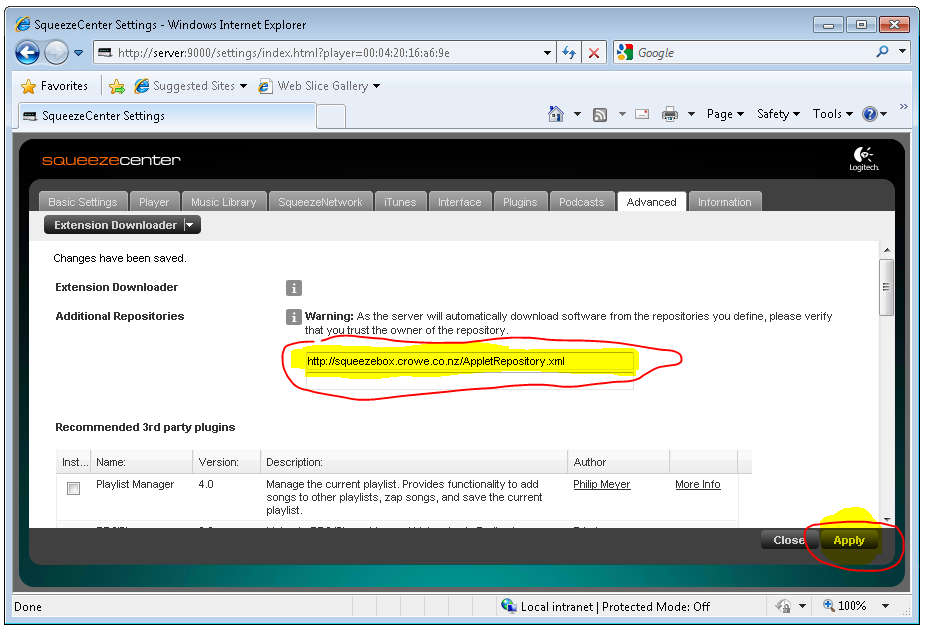
You need to configure this on your Squeezebox-Controller or SqueezePlay
- Navigate to Settings -> Advanced -> Applet Installer.
- In this menu you should see each of the applets which Squeezebox-Server has installed together with its version.
- Select which applets you wish to install on the remote and then select Install. This will cause the applets to be downloaded and installed. After they are installed the SqueezeBox Controller will restart (on the SqueezePlay you will need to shut it down and restart it manually).
Please note the subtle differences of this menu in 7.3 and 7.4 firmwares:
7.3: selecting 'Install' will immediatly download and install the applet
7.4: selecting 'Install' is just a preselection. You are thus able to select more than one applet at once.
After selection go one menu up, where you have the 'real' install button which will show the count of selected applets.
- Once restarted the new applets should be available, normally under the Extras menu (but it depends on the applet)
If you can't see this menu you might have to activate it. Just go under 'Settings->Home Menu' where you will be able to activate the 'Extras'-menu
Manual installation
If you want to install an applet manually you can do the following:
- Enable ssh access on the SBC. On the SqueezeBox Controller go to the Settings->Advanced->Remote Login and checking "Enable SSH". When you enable SSH you will be given a password (my default was 1234) and it will also give you the IP Address of the controller. Write both down.
 SSH is "secure shell" and it just a way of connecting remotely to computers and other devices.
 SCP is secure copy, which is a way of uploading/downloading files to computers and other devices.
- download WinSCP or some other SCP client - see this example of connecting to the SBC with WINSCP
- connect to the SCP and login as root with the password it gave you when you enabled ssh
- extract the zip file for the applet on your PC
- look in the extracted files and you will find another zip file
- extract that zip file
- use SCP to copy the folders from the second zip file into /usr/share/jive/applets on the SBC
- restart the SBC
- Normally the applet will show up in the Extras menu but it can appear in the main menu as well.
Source: http://forums.slimdevices.com/showthread.php?t=47798
Applets
The following are brief descriptions of the applets attached to this page:
(note: links below have been restored)
RetroBrowser: an applet for displaying the traditional squeezebox player display on the remote. This is useful if you wish to navigate through the old menu structure from the remote, e.g. if you have server plugins installed which do not support the jive remote. Author: Triode
Invaders: a Space Invaders game for the SqueezeboxController. Author: Rafael
Snake: a Snake game for the SqueezeboxController. Author: Lukas Frey
Lyrics: Show lyrics on Squeezebox Controller display. Author: Les Smithson (minor update by Ben Klaas to conform to new SqueezePlay main menu API)
Tetris: a Tetris game for the SqueezeboxController.
Gravity: a Gravity game for the SqueezeboxController.
MyHome: a plugin that allows you to control an Innovus home automation system from the SqueezeboxController. Author: Thomas Houlberg
Wake-on-LAN: a utility to power up NAS systems, Mediacenters, server, etc. using Wake-on-LAN from the SqueezeboxController. Author: Thomas Houlberg
B&O Remote controle: a simple implementation of the B&O A9 key-ring. Allows you to turn on and off B&O audio, video and light from the SqueezeboxController. Author: Thomas Houlberg
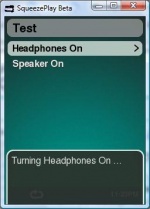
Headphone Switch: this applet will install a 'Headphone Switch' menu, from where you can choose to turn on the integrated headphones or speaker. This is useful if headphone-switching isn't working automatically.. Author: Stefan Hansel / Repository-URL: http://www.stagessound.de/bluegaspode.xml
Daylight Clock applet: a screensaver which shows a clock with a daylight map of earth in the background. Author: Erland Isaksson
Custom Clock applet: a screensaver which shows a configurable clock where you can select among a number of different styles. Author: Erland Isaksson
Information Screen plugin: a screensaver which can switch between a number of different screens with information. Author: Erland Isaksson
Album Flow applet: a screensaver/browsing applet which browse your albums like slideshow a bit similar to Apple's coverflow. Author: Erland Isaksson
Screen Switcher applet: a screensaver applet that makes it possible to continuously switch between different screen savers. Author: Erland Isaksson
Applets in Repositories
See SqueezeCenter Repositories for some respositories you can use for other existing applets.


